Posts

Showing posts with the label Coding

Picante: Audio

My plan was always to do a SID-style synthesizer so I could make C64-style sounds on the picante. I've managed to make a thing! This is a software synth running on a RaspberryPi Pico attached to an Adafruit UDA1334 I2S module (recorded through the mic jack on my PC). Getting the UDA1334 working The official Adafruit guide was useful, but not perfect as it didn't cover the Pi Pico.  The micropython examples on how to play a tone and how to play a wav from an sd card were really  useful though. First, I got the play tone working, then I adapted the sd card (non-blocking) interrupt to play a continuous tone (which was just beautiful and didn't make my ears bleed at all). Starting on the Synth I then had to do a LOT of thinking about how I could make this synth fast enough and low-RAM enough for a Pi Pico.  After trying out a few combinations of parameters, I settled on a sampling rate of 16kHz and 16 bits per sample.  I wanted the synth to work on different wavef...

Picante: Render Buffer Go Bye-Bye

What's gone wrong My initial approach to rendering in a timely manner involved native/C code to 'blit' bitmaps to an 8bpp render buffer.  Every frame, that render buffer is expanded into 16bpp stripes for transfer to the display.  At about 18-19fps, this was pretty tidy. The next step I wanted to take was to render tilemaps to the background, so I found a tileset online and converted into bytes() objects in a .py file for import...and promptly ran out of RAM. The New Proposed Approach So then I started looking at a 4bpp (16 colour) render buffer with colour palette, and I didn't like the amount of pixel operations involved in drawing to it, let alone expanding it out to the stripe for display. So my intention now is to store a list of render commands for each stripe of the display.  These commands could be partial 'blits' of a bitmap, or straight colour-fill, or whatever else.  The key thing is that they are only actually executed once all render commands have b...

C64 Dev with Relaunch64

So moving house has been an absolute pain in the plums.  Monthly projects are on hiatus and until the start-of-term chaos has died down, I'm working on the odd piece of project here and there. The first such project is doing some C64 development, which I've wanted to do for literally years.  I bought an SD-card reader from the future was 8-bit and when it arrived, I dug out  my C64 from storage and powered it on... ...and it was dead. Not fully dead, just...weird.  Blue border and blue background are fine but the screen is filled up with garbage text. So step 1: order a new power supply.  The PSU I was using wasn't a Commodore original, but a replacement from the late 80s.  The problem could still be a b0rked or loose chip, but I got paranoid about using a vintage PSU anyways so I ordered one from Poland.  If that doesn't fix it, I plan to follow some of the procedures here . In the mean-time, I decided to search for an IDE that would run on linux and...

Micro:Bit and SPI display

I want to explore the full potential of the BBC Micro:bits my school has. Making rock-paper-scissors games and the like is all well and good, and the students love it (for the most part), but it always feels a little bit gimmicky.  But when students really get engaged and suggest ideas for them (e.g. games, compass display), it all gets a little bit cramped and feels like it could  kinda  work, but not really . Then I found out that all the tiny strips on the edge are actually GPIO pins, not just the fat 0, 1 and 2 ones.  Since then, I've wanted to explore what I can do with it. Hence, over the last few days I have been trying to get the microbit to control a TFT display. I first went for this 2.4" display with a touchscreen.  The SPI interface is just for the microSD, not for the screen but I didn't think that would be a problem because the micro:bit has so many pins.  After much frustration, I discovered that there are many of the pins you can't reliabl...

Adventures in Wave-Function Collapse 2: DIY Recursion

This post follows on from a previous post about my recent attempts to implement the Wave-Function Collapse algorithm in Godot's GDScript to generate tile map levels. I'm only just posting it now because I didn't realise I'd left it as a 'draft'.  Woe is me. As I mentioned in the previous post, this isn't meant as a set of instructions - more as a reminder for my future self so I don't fall into the same traps again.  That said, hopefully someone else finds it useful as well. Dealing with contradictions When you are trying to generate a grid of tiles using Wave Function Collapse, each cell in the grid can be the top-left corner of one (and only one) super-tile.  As soon as you choose a super-tile for one grid cell, it limits which super-tiles the nearby cells can be.  This is implemented as adjacency rules: essentially there is a set of tiles which is allowed to be to the right of (or left of, or above or below) the chosen super-tile. A contradiction oc...

Adventures in Wave-Function Collapse 1: Super-Tiles

Image
Recently, I have been spending a lot of time trying to implement the Wave Function Collapse algorithm to generate tilemaps.  I think Robert Heaton does a great job of explaining what the algorithm is, but I still needed to figure out a lot when implementing it with tilemaps. This post is the first in a set to document for my future self some of what I learned, so I don't fall into the same traps when I inevitably return to it further down the road. Tiles in bitmap version → super-tiles in tilemap version   An individual tilemap tile is equivalent to a pixel, so super-tiles are collections these tilemap tiles The significance of the size of the super-tiles wasn't clear to me until I tried out different sizes.  The super-tiles I used were square, but in the discussion here I only consider a single dimension to try and make things clearer.  (I also ignore the fact that when the super-tiles are produced, they are usually allowed to wrap from one edge of the template to...

Faster Mode-X Sprite Rendering

Back in June, I made a sprite rendering system for DOS/VGA Mode-X.  Running it on a pcem 386 showed that the sprite clipping code was hella slow . So I decided to rip out the clipping code.  To allow sprites to overlap the screen boundary, I set up the VGA display registers to have a 32px off-screen border around the display. The system still splits the sprite into separate planes, and it still works by skipping some pixels then drawing some. It works across a scanline (within a single plane) so I can use rep movsb.  It also hard-codes the scanline width into the number of pixel bytes to skip - that's so I don't have to multiply the display width by the number of scan-lines to skip.  That means my game can only run in a single screen resolution, but it's only going to run in Mode-X so that's not a problem. Another tweak is that as much as possible, it loads 16-bits of data at a time.  This should make better use of the bus, which can be an issue with the 386SX....

Lowrezjam 2020 entry: F-Z

      This evening I submitted F-Z , my entry for Lowrezjam2020 . I was going to make a helicopter game, but in 64x64 pixels I just couldn't get anything to actually look like a helicopter!  So I completely changed my mind and made an F-Zero style racer instead. In the limited time allowed for the jam, I only managed to make a single track.  However, the game was reasonably polished: it had a title-screen, menu, AI opponents, music, sound effects and a 'finished' race outro - with a particle effect for a podium place! It was the first time I'd written a racing AI.  I basically baked the AI instructions into the track tilemap, giving each AI-sector a heading value.  The runtime code loaded the sector polygon and calculated a middle-line for the sector using the polygon vertices and the heading.  The runtime AI first checked if it was way off the heading for the sector and corrected for that.  If the heading was okay, it checked if it was too...

DOS Coding: Sound Blaster sound

SB Documentation link . BASE_PORT = the base I/O port the SB is listening on (most often 0x220, but see 'detecting the card' below) Single vs Auto mode: For single transfer playback, you don't really need the Interrupt Service Routine. I've shifted to auto-initialise mode because I was getting clicks between each transfer. For auto-initialise mode, you set up the DMA for the whole buffer, but tell the SB/DSP it's half the buffer size.  That way, once the first half is transferred, you get an interrupt to say you can overwrite the first half.  Then when the whole lot is transferred, you get another interrupt to say you can overwrite the second half.  (By that time the DMA has already auto-reset back and started transferring the first half of the buffer) Step 1: setting up sb_read() and sb_write() subroutines You should really check if the soundblaster is ready before reading or writing. Seeing as you need to write and read to detect/reset the card, these really come ...

Update: SilkWorm Tribute

Lots of trial, error and frustration has got me to this stage: This video was screen-grabbed from pcem running as a 386SX. 386s are SLOW AS ALL HELL, so I had to do some trickery for the parallax scroll: Use a 'trash buffer': I set up the VGA so there is 32px of invisible data to the left and right of the display (and also above it).  This means I don't have to worry about clipping my sprites.  If they're even partially on-screen, there's enough trash VRAM around the screen that it won't wrap round or corrupt other pixel data. Shrink game area: use a status display to shrink the rendered game area.  I did this with the VGA's Line Compare functionality, so that when it reaches pixel row 176, it will reset to render from VGA offset 0x0000.  (I also had to change the Pixel Panning Mode bit in the Attribute Mode Control Register because I use hardware panning). Solid colour blanking: this can be done with an asm rep stosb and a suitably large value in cx.  ...

VGA Mode-X Sprite Rendering

As part of my SilkWorm project, I've got a transparent sprite-rendering system going. It's over-complicated, but it works quite quickly.  I'm writing this more as a reminder to my future self than as a HOWTO, so I'll not go into the gory details. The system is inspired by a really nice idea from StaticSaga and 36rKATPURPY on the Discord server linked to a DOS game jam .  Their system is simpler and more data-efficient.  My code is clunky but for the moment seems to work, so I'm leaving it as is until it breaks or needs speeding-up. The problem Mode-X stores pixel data in planes.  It can use VGA hardware to copy 4 pixels at a time, but only on 4px-aligned boundaries.  Michael Abrash' Black Book covers one method of how to do transparent sprite rendering without the 4px alignment, but it involves uploading 4 copies of each sprite to VGA RAM, and setting the plane mask for every 4-pixel copy.  To me, this seemed like a waste of VGA RAM, and any speed boost w...

Deus Heist

Image
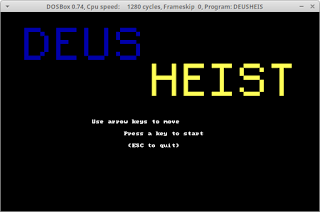
I managed to make a playable level of a DOS heist game . It's a text-based game, built for 16-bit DOS, so in theory , it should run on a 286 (albeit as slow as a sedated two-legged dog).  I haven't had any time for optimising it, and the code is hideous, but it is  technically playable. The main feature is the visibility check, modelled on the game Monaco: What's Yours is Mine . It scans out from the player, checking if a cell blocks line-of-sight or not.  I made it fairly efficient by splitting the check into quadrants (N, E, S, W) and scanning cells between two edge-lines.  If it encountered an opaque block, it would split the scan up and recurse. On DOSBox, it gets a little slow when you can see a lot of the screen.  I imagine on a 286, this would crawl.  However, the game world does not change at all in the current version, so there are no guards going to creep up on you while you're lagging. I could also help things by designing the map...

Dos tidbit: register-based Watcall parameter order

It has occurred to me that in the course of writing DOS programs (some of which even work!), I spend an awful lot of time searching through documentation.  Which is, you know...fine.  It's part of the charm of retro coding. However, this ancient source has an inaccuracy which has bitten me twice (the second time because I forget about 99% of what I read).  Not that I bear the author any ill-will - if a document as detailed and comprehensive as that contained no inaccuracies at all, I would be worshiping the author as some kind of god.  It might even have been accurate at the time of writing (2010CE).  There's plenty more in that site which I intend to dig through and learn from as well. Anyway.  What bit me: When using register-based watcall* to call an asm procedure from C/C++, 16-bit parameters are passed in this order: AX, DX , BX, CX.   *in OpenWatcom V2 at time of writing. As I read it, the document says it is in the order AX, BX, CX, DX...

WIP DOS Game Jam Entry

Image
So for some reason I decided to really get my geek on and make an entry for the DOS Game Jam on itch.io. Whilst the game jam rules are really relaxed, I decided to head straight for making a game for real DOS-era hardware.  Then I decided making a game for mode 13h or mode X was a path too well trodden.  So I started messing around in mode 12h (640x480 16 colours). First, the tools: I went for Open Watcom to build and DosBox to run it.  They are both mature tools and work well on Ubuntu (Open Watcom under WINE). I very quickly decided I didn't like Open Watcom's code editor though, so I only use the IDE for building the code.  Geany is a lovely little editor which I like a lot more. Thence into the dark realms of x86 interrupts to set the video mode and direct-writes to hard-coded memory locations.  Coding ground to a halt immediately as I proceeded to read what felt like the entire internet . I had to learn about what an I/O port was and how to ...

Winforms WYSIWYG development on Ubuntu

...can it be that this is impossible without Windoze in a VM? Specifically for WYSIWYG dialog editor: Visual Studio Community runs like a dog in a VM.* Visual Studio Code doesn't appear to have one. Monodevelop only has a GTK# one** Jetbrains Rider is a 'cross platform' IDE but the WYSIWYG tool only works on Windoze . >_< SharpDevelop is built in .NET but for some reason uses Windoze-specific code . Is the only serious option to dual-boot with Win7/10?  SERIOUSLY? Who ever said that .NET is cross platform? Gromgromgrom. So I'm left going with a Win10 VM running on a ramdisk and a second virtual drive on HDD to hold the code.  Seeing as I want to commit and push the code straight back to source control, it shouldn't be a problem that the local copy of the code is trapped in a virtual disk. *it isn't _all_ that bad in qemu/kvm if you're running Win10 from a ramdisk, but make sure you get your syncing to HDD right or you could lose a lo...

GRG16 - Now with keyboard input!

The original goal was to make a Mega-drive-like virtual games console which wouldn't have a keyboard.  After some thought, I realised that keyboard input might help me with both the teaching/learning goals (by giving scope for a wider variety of activities) and the development (by giving me easily testable incremental steps towards the final program). So now I have a keyboard device which populates two memory locations: one for the currently-depressed key, and a second for the current modifier state (CTRL, SHIFT, ALT). Plus, after much painful debugging, I have a program written for the VM in assembler which reads the key state and displays typed characters to the screen. This highlighted the need for development/debugging tools for the virtual console itself, and I am seriously daunted by the prospect of having to develop them. Also, I no longer like the BusController being in its own separate thread.  I've already had problems with the compiler optimising out re...

GRG16 Update

Image
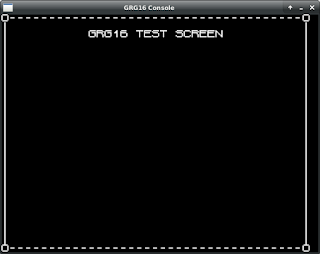
Back in March, I posted an update talking about a bunch of stuff I would do. Nearly 5 months later, those things are pretty much done (with a couple of tweaks), and here is the jaw-dropping screenshot!!!! What do you mean, your jaw hasn't dropped? O_o Tbh, I can understand you being underwhelmed.  It is a singularly unimpressive screenshot, and the blank column on the right shows it doesn't even work properly. BUT! What the GRG-16 program is actually doing is loading and running a binary ROM file which contains the definition of the screen (set of character codes) AND assembler code to draw that definition to the screen. So behind the scenes, there are many moving parts.  There is an assembler which can take a text file and put together a binary ROM with instructions and data. Then there is the GRG-16 program itself, which has a CPU, ROM device, graphics device and a 'BusController' to copy data between them. At the minute, this is based on an SDL ...

2-Button Jam: Postmortem

Image
What? I participated in my first itch game jam and it was great fun.  I thought I'd write a postmortem for posterity and in case anybody might find it useful. The jam The game Art apps used: GIMP , Pinta , Tiled Sound apps used: Beepbox , Audacity Engine used: Godot How I came to the game jam I used to work as a game programmer and I've always harboured my dream of making my own games.  I'd been to my local game developer meetup , and we'd discussed itch game jams as a motivational tool.  When the Easter holidays came around (I'm a full-time teacher), I decided I would take the plunge.  I chose the 8-bits-to-infinity jam because the constraint of only using two buttons intrigued me. Initial ideas for the game With such a strong limitation as only having two buttons, I decided to start with the mechanics.  Having played Micro-Machines on the PSX back in the day, I remembered playing 4-player with only two controllers.  Each player had hal...